


Recording Studio Equipment Image       Build Your Recording Studio at www.homerecorder.com        Call Us Toll Free: (888) 448-0661
About Us |Contact Us

Home

Celemony Melodyne Editor DNA Direct Note Access Pitch Shift Software

Celemony Melodyne Editor DNA Direct Note Access Pitch Shift Software
Value Buy Now

Retail Price: $349.99

SALE PRICE: $299.99 Free Shipping!

You Save: 14 %

Sold Out

Ask A Question

Refashion the music in your recordings and samples intuitively, and in outstanding sound quality, reaching (thanks to DNA Direct Note Access) all the way down to the individual notes of which chords are composed. Available Now.

The New Power of Melodyne

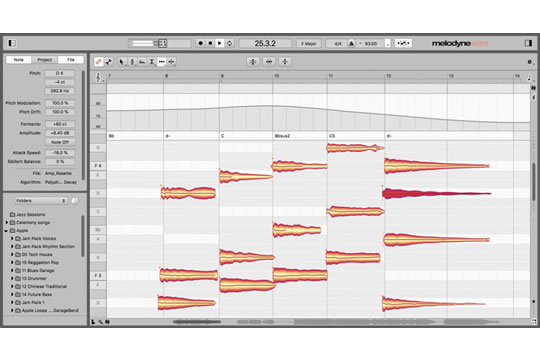
Melodyne editor is the first Celemony product to offer the revolutionary Direct Note Access technology. This makes possible what had previously been considered impossible: access to individual notes in polyphonic audio material. Correct wrong notes in a piano recording; change the chords in a guitar accompaniment after the recording is over; refashion a sample lick. Melodyne editor lets you do things of which, until now, you could only dream.

Massive Freedom

With Melodyne editor you can edit your audio material in an intuitive and flexible way. Simply move an audio note to a different pitch or a different position. Make notes longer or shorter, louder or softer. Delete notes from chords or add new ones by copying. Transpose or quantize your material, create from it melodic, harmonic and rhythmic variations. Once you've experienced the power to reshape audio in this way, you won't want to live without it.

The Best of Company

Melodyne software is at home in all the great studios of the world and can be heard on countless productions. Leading producers are of one voice in praising the sound quality, flexibility, swiftness and reliability that Melodyne brings to their day-to-day work. Melodyne editor continues this great tradition and with DNA Direct Note Access permits completely new applications that make Melodyne still more indispensable.

A New Audio Age

Melodyne editor with DNA Direct Note Access represents a quantum leap in audio editing and the logical continuation of the musical approach for which Melodyne is known. Direct Note Access will change the way we work with audio. A new, simpler and more creative audio age is dawning, and with Melodyne editor you're in at the start.

Melodyne editor: Applications

Melodyne editor will make your life with audio far simpler. And bring new creativity to your work.

First Take: Final Take

That inspired first take can, with Melodyne editor, be the final one, even if it wasn't error free. Simply reach into the recording and move wrong notes to the correct place or erase them. You can even correct intonation or timing errors automatically by macro if you wish, even if the material is polyphonic.

Perfect Vocals

Melodyne has proved itself a thousand times in the correction and optimization of vocal recordings. Melodyne editor with Direct Note Access offers still greater mastery of this high art: intonation and timing problems, unsteady volume, exaggerated or weak vibrato, all that can be corrected with a few mouse clicks. And the sound quality is Melodyne's best ever!

Perfect Timing

With Melodyne editor, it's child's play to get things spot-on. You can adjust effortlessly and continuously the extent to which a performance deviates from metronomic precision and even give recordings a totally different rhythm. When quantizing, Melodyne not only moves individual notes but also adjusts their length, even when the material is polyphonic. That guarantees results of unprecedented musicality.

Sound Library Reloaded

With Melodyne editor, much will change. Including your sound library, which will become virtually infinite in extent. Since you'll be able to alter at will the tempo, timing, melody and harmonies of your sampled licks and phrases, adding or deleting notes as you please, you'll always have perfect samples to hand for the production you're working on. And as many variations as you wish.

No Detours

Melodyne editor operates directly within your audio workstation. You hear all edits in the context of the other tracks of your project and can use as many instances as you like and your computer will allow. And for the swift editing of a sample between times, you can open Melodyne editor in stand-alone mode without having to start up your audio workstation first.

Polyphony a la carte

With Melodyne editor, whether a track is monophonic or polyphonic is not a fact, but a condition you have the creative freedom to override. Copy or cut notes, and paste them in new locations. You can implement doubling, create second voices, construct chords where none were there before or thin out harmonies that are unduly dense.

Recycling Perfection

Since with Melodyne editor, the melody, harmony, tempo and timing of audio material can be reshaped at will, you can always find a new home for recordings in your archive. You could, for example, take a guitar track from an old recording, change the key and tempo, add a light shuffle and integrate it seamlessly into your current project.

Design Right Down to the Details

Access to the individual notes offers totally new freedom in sound design. You can, for example, alter the volume or formant spectrum of individual notes in order to give chords a different coloration and character. By copying and pasting, you can even swap sounds replacing, for example, the piano sounds of a chord with marimba sounds, even if they were taken from a totally different chord.

Features

  • single-track audio editing environment with Melodyne technology
  • suitable for monophonic, polyphonic and rhythmic/complex audio material
  • offers with DNA direct access to individual notes within chords
  • works as a plug-in (VST, AU, RTAS) in compatible DAWs under Mac OS X and Windows
  • can also be used in stand-alone mode
  • activation on up to two computers or via iLok
  • user interface and manual in English, German, French, Spanish and Japanese

Applications

  • manual or automatic correction of intonation and timing errors
  • refashioning of melodies, harmonies, timing and rhythm
  • transposition including adjustment to scale
  • modifying various note parameters such as volume, vibrato, formant spectrum
  • pitch shifting and time stretching
  • (re-)quantization
  • MIDI file export

Monophonic and Polyphonic Material

In the case of monophonic (solo voice, saxophone, bass guitar...) and polyphonic (piano, guitar...) audio material, the following possibilities exist for editing notes:

  • modifying the pitch
  • modifying the pitch drift
  • modifying the pitch modulation
  • modifying the position
  • modifying the length
  • modifying the volume
  • shifting the formant spectrum
  • modifying the pitch of any transition between notes
  • modifying the volume of any transition between notes
  • shifting the formant spectrum of any transition between notes
  • timing (re-)quantization, manually or via macro pitch quantization, manually or via macro
  • cut, copy and paste

If, in the case of polyphonic material, two or more instruments play a note of the same pitch on the same beat, one note only, representing the combined sound of the instruments in question, is available for editing (no separation of instruments).

Rhythmic and Complex Material

In the case of rhythmic and complex material, separation is according to beats, so if several notes (e.g. click and snare) sound on the same beat, they are available for editing in the shape of a Melodyne blob. For such blobs, the following editing possibilities exist:

  • modifying the pitch (relative)
  • modifying the position
  • modifying the length
  • modifying the volume
  • shifting the formant spectrum
  • modifying the volume transition between blobs
  • shifting the formant spectrum of transitions between blobs
  • timing quantization, manually or via macro
  • cut, copy and paste

System Requirements

Dual (Core) PowerPC G5 or Intel Dual Core processor, 2 GB RAM, OS X 10.4 or later

Intel or AMD Dual Core processor, 2 GB RAM, Windows XP (SP2 or SP3), Windows Vista or Windows 7, ASIO-compatible audio hardware

 
All Products
Analyzers
Audio Interfaces
Bass Amps
Bass Guitars
Beat Counters
Books
Bundles
Cables
CD/MP3 Players
Compressors
Computers
Control Surfaces
Converters
Crossovers
DI Boxes
Digital Recorders
DJ Equipment
Effects Pedals
Effects Processors
Enhancers
Equalizers
Filters
Gates
Guitar Amps
Guitars
Headphone Amps
Headphones
Keyboard Amps
Keyboards
Lighting
Microphones
MIDI Interfaces
Mixers
Noise Eliminators
PA Speakers
PA Systems
Patchbays
Piano Benches
Power Amps
Power Conditioners
Power Supplies
Preamps
Samplers
Software
Sound Modules
Soundproofing
Splitters
Stands
Studio Monitors
Summing Amps
Tubes
Tuners
Turntables
Tutorials
Wireless


Join Homerecorder
First Name

Last Name

Email

Home Recorder is Paypal Verified

Shop with confidence - Fast & Easy Checkout!